

Architecture
Audience: developers who change the panel, and anyone who wants to know how it works. Covers: the parts, how a visit reaches Odoo, the life of an instance, how code arrives from GitHub, and why each part was chosen.
Contents
- The parts
- How a visit reaches Odoo
- Life of an instance
- Creating an instance
- Code from GitHub
- Why we chose this
- Conventions in the code
1. The parts
| Part | What it is | Where |
|---|---|---|
| Web app | The panel in the browser: React, TypeScript and SCSS design tokens, Chart.js for the live charts, built by Vite and served by Caddy (container sudoo-web) on PANEL_PORT (9000). Caddy forwards /api, /hooks and /docs to the backend and /api/v1/events to the live events. The design system is described in Design. | web/ |
| Backend | The API, /api/v1 (Flask, served by Gunicorn, container sudoo-panel) on 127.0.0.1:API_PORT (9002). | sudoo/web/ |
| Live events | /api/v1/events: every change (jobs, instances, resource figures, settings) pushed to connected clients as Server-Sent Events, on the backend's asyncio loop (the one gateway.py runs), 127.0.0.1:9001. Always in the backend. | sudoo/core/events.py, web/v1/events.py |
| Gateway | One small web server per instance (aiohttp) on 127.0.0.1:<gateway port>. Forwards every request to that instance's Odoo. Runs in its own container, sudoo-gateway (GATEWAY_MODE=service, the default), or inside the backend (embedded). | sudoo/instances/gateway.py, gateway_service.py, gateway_link.py |
| Metrics | Figures of the server and every instance (CPU, memory, requests, errors, response times, uptime, disk) with one hour of history, from the monitor and the gateway. | sudoo/instances/metrics.py |
| Roles | Five roles, each a set of named permissions; every endpoint and action checks a permission, never a role. | sudoo/roles.py |
| Storage | The panel's own data (accounts, tokens, audit log, instance state) in SQLite, behind a storage plugin. | sudoo/storage/ |
| Background work | Threads in the panel's process: resource monitor (every METRICS_INTERVAL_SECONDS, 5 s, reading a continuous docker stats stream), automatic pause (every 2 min), automatic deletion (every 10 min), daily backups (checked every minute, run once DAILY_BACKUP_TIME has passed in TIMEZONE), GitHub polling (every POLL_MINUTES), alerts (the end of every job, and the server and instances every METRICS_INTERVAL_SECONDS; e-mail, webhooks, the bell). | sudoo/background.py, instances/monitor.py, sudoo/alerts/ |
| Backups | Odoo-format zips (dump.sql, filestore/, manifest.json) in BACKUPS_DIR, named <instance>__<database>__<YYYYMMDD-HHMMSS>__<kind>.zip. Seven kinds: manual, daily, deletion, before-restore, before-rollback, before-repair, before-update; each instance keeps only its latest daily, before-restore, before-rollback, before-repair and before-update (taken before a code update, put back when it fails: SAFE_UPDATES), before-restore and before-rollback for ROLLBACK_HOURS. Restoring replaces an instance's database and filestore in place; a backup of another instance of the same Odoo series is loaded under the target's database name and neutralised. | sudoo/instances/backups.py, instances/operations.py |
| Jobs | Every action (create, update, restart...) runs as a job in its own thread, with steps, notes and a log. One job at a time per instance; others wait. | sudoo/core/jobs.py, instances/operations.py |
| Exposure plugin | Makes the panel and each gateway reachable from outside. Default cloudflare-quick: one cloudflared container per target, opening an outgoing connection to Cloudflare. Alternative host-ports: the ports are opened on the server. | sudoo/exposure/ |
| Add-on source plugin | Provides the Enterprise add-ons of a version: an existing folder (folder) or a branch of a git repository (git). | sudoo/addons/ |
| Settings | Every setting, typed and checked (pydantic-settings). Almost all can be changed on the Settings page while the panel runs, kept on top of .env with secrets encrypted. | sudoo/config.py |
| Instances | One Docker Compose project per instance: an odoo container (official image) and a db container (PostgreSQL 16), two volumes. | /opt/odoo/instances/<name>/ |
The backend (API, live events, background work, jobs) runs in one container and one process (sudoo-panel), so they share their state in memory without a message queue; the web app is a second, separate container (sudoo-web) that holds no state. The gateways run in a third container, sudoo-gateway, so that visitors keep reaching the instances while the backend restarts or is down (next section). All three use the server's network (network_mode: host), so 127.0.0.1 means the same inside and outside them; only the backend uses the server's Docker, through /var/run/docker.sock.
Each instance uses three ports on 127.0.0.1, chosen when it is created and stored in its .env:
| Port | Starts at | Used by |
|---|---|---|
GATEWAY_PORT | 8069 | The gateway listens here; the instance's connector points here. |
ODOO_PORT | 28069 | Odoo itself; only the gateway connects to it. |
CONNECTOR_METRICS_PORT | 20300 | The connector reports its public address here. |
2. How a visit reaches Odoo
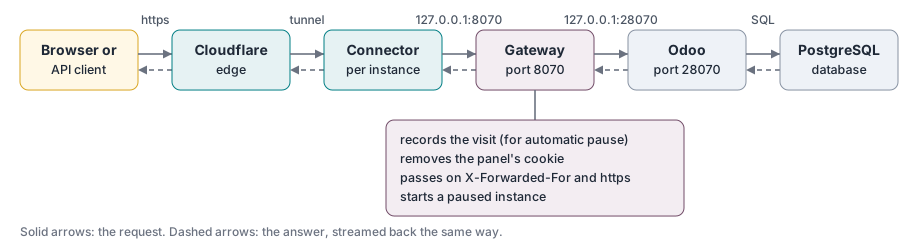
Odoo runs with proxy_mode = True, so it trusts the forwarded headers: it sees the visitor's real address and knows the visit came over https. WebSocket connections (Odoo's live updates, /websocket) take the same path.
The gateway service. The gateway ports belong to the sudoo-gateway container (sudoo.sh gateway, instances/gateway_service.py), not to the backend. It has no Docker socket, no .env and none of the panel's data; it shares one folder with the backend, <ODOO_ROOT>/gateway (root only):
| File | Written by | What it is |
|---|---|---|
routes.json | backend | Every instance's gateway and Odoo port and whether it is switched off, the address to listen on and the visitor-address header the exposure trusts, and the gateway settings (also those changed in the panel). |
visits.json | gateway | The last visit of every instance; the backend takes newer ones into the instance state (automatic pause, daily backups). |
gateway.sock | gateway | Control channel: POST /sync makes the gateway read routes.json and reconcile its listeners now, and answers with them, their errors and the requests counted since the last call (the backend adds them to the metrics); GET /healthz for the health check. |
panel.sock | backend | POST /wake/<name>: the gateway asks the backend to start a paused instance. |
The backend (instances/gateway_link.py) runs one round every 2 seconds and at once when an instance is created or deleted: write routes.json if it changed, POST /sync, read visits.json. While the backend is down, the gateway keeps serving with the last routes.json, records visits and counts requests; a visitor of a paused instance gets "Starting soon" (the page asks again every 4 seconds) until the backend is back and starts it. While the gateway service does not answer, the backend serves the instances itself, exactly as in embedded mode: at once when gateway.sock is missing (no service, or it stopped normally), after GATEWAY_TAKEOVER_SECONDS otherwise. Both open the ports with SO_REUSEPORT, so a port is handed over without a moment where nobody listens. With GATEWAY_MODE=embedded the backend writes routes.json with mode embedded and keeps the ports; a gateway service that still runs then holds none.
When the instance is paused, the gateway notices that Odoo does not answer, starts the instance once, and answers in the meantime:
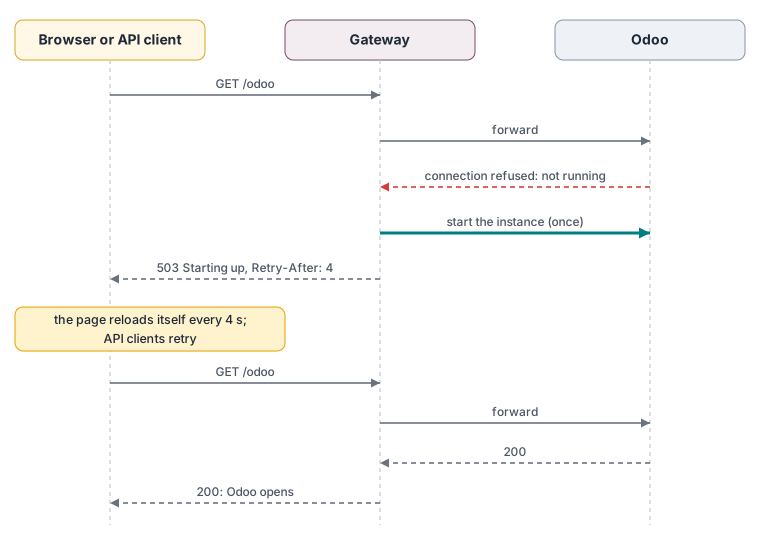
Browsers get a small page that reloads itself; API clients get plain text. Both get HTTP 503 with Retry-After, which API clients and webhook senders understand as "try again shortly".
Each Odoo database also receives its public address, so links that Odoo writes (in e-mails, the portal, payment and webhook pages) are right:
| Odoo system parameter | Value | Why |
|---|---|---|
web.base.url | the instance's current link | links in e-mails, portal, payments, webhooks |
web.base.url.freeze | True | otherwise Odoo replaces it with the address an administrator signs in from |
report.url | http://localhost:8069 | PDF reports load their styles from Odoo itself, not through the tunnel |
When a link changes (after a restart), the monitor sees it within 15 seconds and updates web.base.url.
3. Life of an instance
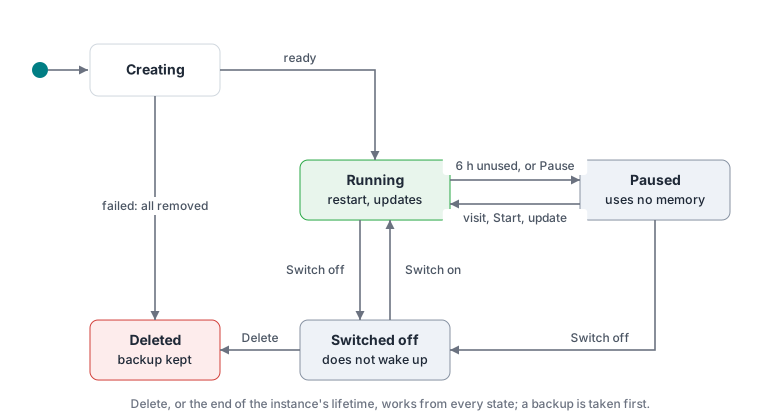
| State | What runs |
|---|---|
| Running | Odoo, PostgreSQL, connector |
| Paused | connector only (so a visit still reaches the gateway, which starts the rest) |
| Switched off | connector only; the gateway answers "Switched off" and does not start anything |
Besides its files, each instance has a small record in the panel's storage (core/state.py, collection instance_state):
| Field | Meaning |
|---|---|
last_visit | The latest request through the gateway, or start; the automatic pause counts from it. |
used_since | The first visit or start after the instance's last daily backup. Set by the gateway and by every start or restart, cleared when the daily backup starts. The daily backup loop backs up an instance only when used_since is earlier than the latest backup time. |
paused, switched_off | Why the instance is stopped. |
branch_missing | The branch no longer exists on GitHub. |
Visits are kept in memory and written at most every 30 seconds; the other fields are written at once.
Backups and restores. Jobs of kind backup take a manual backup (Back up now), a daily one (the daily loop) or a deletion one (first step of a deletion). A backup starts only the database container of a paused instance and stops it again afterwards. The restore job (permission instances.restore) saves a before-restore backup, stops Odoo, drops and creates the database, loads dump.sql through psql, replaces the filestore through a one-off container of the instance's Odoo image, sets web.base.url to the current link and starts Odoo. A backup of another instance (checked against the Odoo series in its manifest.json) goes into the target's database name and is neutralised (odoo neutralize in a one-off container on Odoo 16+, SQL otherwise) before Odoo starts; a new instance can be created from one the same way instead of an empty database. The rollback job restores the newest before-restore backup while it is younger than ROLLBACK_HOURS, after saving a before-rollback one (so it never replaces its own snapshot); a background loop removes expired snapshots every five minutes when no job runs.
4. Creating an instance
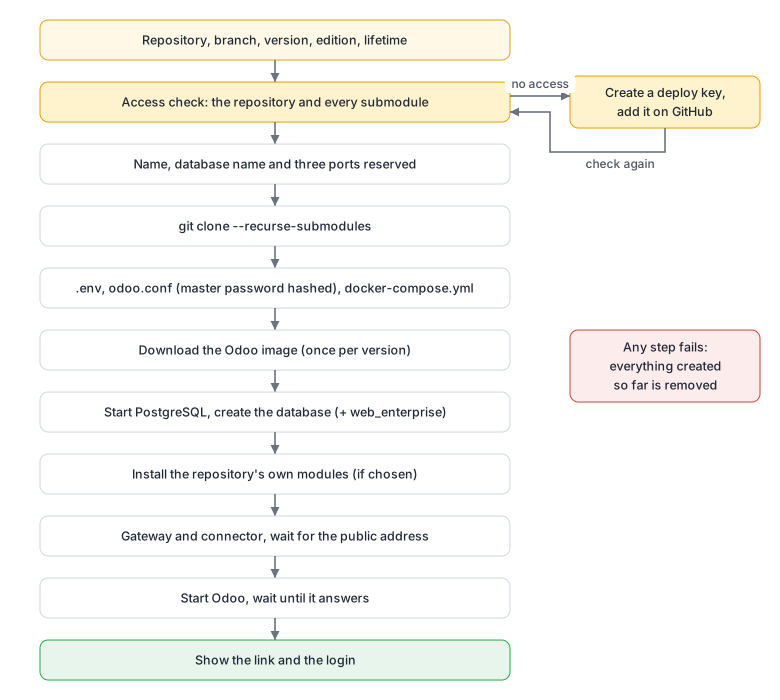
If any step fails, everything created so far (containers, volumes, connector, folder) is removed, so the same name can be used again. addons_path lists every folder of the repository that contains modules (including submodules such as oca/web), then the Enterprise add-ons; it is recalculated on every start, restart and update.
5. Code from GitHub
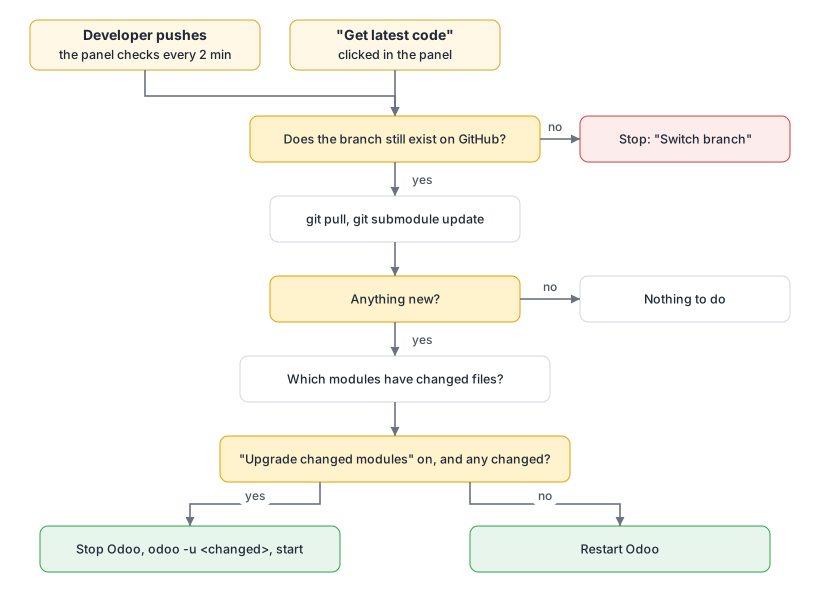
How git reaches GitHub is configured once for every git command the panel runs (github.configure_git):
| Repository | Way |
|---|---|
| has a deploy key on the server | SSH with that repository's key (git_ssh.py decrypts it for the length of the connection) |
| any other | HTTPS; when GitHub asks for credentials, git's credential helper (git_credential.py) hands it a read-only installation token of the panel's GitHub App installed on the repository's owner (github_app.py); public repositories need none |
Both https://github.com/owner/repo and git@github.com:owner/repo addresses, including those written in .gitmodules, are mapped to that one way. See Deploy keys and Git submodules.
6. Why we chose this
Each decision lists what we chose, why, what it costs, and the alternatives we considered.
Docker with the official Odoo image
- Chosen: the official
odoo:<version>andpostgres:16images, unchanged. - Why: nothing to build or maintain; every version behaves exactly as Odoo publishes it; a new Odoo version is a new tag; instances cannot affect the server's own software.
- Cost: Python libraries that custom modules need (
requirements.txt) are not included. - Considered: our own image per project (more to maintain, slower to start an instance); installing Odoo directly on the server (versions would conflict with each other).
One Docker Compose project per instance
- Chosen: every instance has its own Odoo container, its own PostgreSQL container and its own volumes.
- Why: instances are fully independent: one can be restarted, paused, broken or deleted without touching the others, and deleting removes everything it had.
- Cost: each PostgreSQL uses some memory (about 50 to 100 MB), more than one shared database server would.
- Considered: one PostgreSQL for all instances (less memory, but one instance's problem or restore could affect the others, and deleting would need careful clean-up).
A gateway in front of every Odoo
- Chosen: visitors reach a small gateway, which forwards to Odoo. See Gateway.
- Why: a stopped Odoo cannot start itself, and Odoo does not know when it was last used. The gateway sees every request, so it records the last visit, starts a paused instance on the first request and shows clear pages ("Starting up", "Update in progress", "Switched off").
- Cost: the gateway must run for instances to be reachable; it restarts automatically with the server.
- Considered: nginx (cannot start a stopped container by itself); keeping every instance running (not enough memory).
The gateway in its own container, waking through the backend
- Chosen: the gateways run in
sudoo-gateway, without Docker access; to start a paused instance it asks the backend over a Unix socket (panel.sock). While the backend is down it shows "Starting soon" and asks again. - Why: updating or restarting the backend no longer takes every instance offline, and the process that faces the internet holds no key to the server: the Docker socket is root on the host, so a gateway with it would be as powerful as the backend, which is exactly what the separation avoids. Running instances, and production instances (which never pause), do not need the backend at all; only waking a paused one waits for it.
- Cost: a paused instance cannot start while the backend is down; one more container (about 40 MB).
- Considered: the gateway starting the instance's two containers itself (needs the Docker socket, or a proxy that only allows
startofodoo-*containers: still a way to Docker from the internet-facing process, and starting is not enough, since the backend first applies the instance's current configuration); a TCP port with a shared secret (a Unix socket in a root-only folder is unreachable from the network and the instances' containers, with nothing to leak).
Cloudflare quick tunnels for public access
- Chosen: each destination (panel, every instance) has a
cloudflaredconnector that connects out to Cloudflare and receives a free https address. See Tunneling. - Why: the server is a container behind its provider's machine; only SSH is forwarded to it and the provider will not forward more. Outgoing connections are allowed, and a tunnel only needs outgoing connections. Quick tunnels need no account and no domain, cost nothing and include https.
- Cost: links change when the server or a connector restarts. The panel always shows the current links and updates each Odoo's own address automatically.
- Considered: opening ports (not available); SSH tunnels (every user, client and webhook sender would need SSH access); Tailscale Funnel (free and permanent, but account, expiring keys and one device per address); a Cloudflare named tunnel with our own domain (permanent links, needs a domain: the natural next step).
One link per instance
- Chosen: every instance has its own link and Odoo runs at its normal paths.
- Why: Odoo cannot run under a sub-path such as
/instance/sales/. A shared address would need a cookie to remember the instance, which breaks API calls, webhooks, links in e-mails and having two instances open at the same time. - Cost: one small connector per instance (about 30 MB of memory).
One GitHub App per panel, deploy keys as the fallback
- Chosen: each panel registers its own private, read-only GitHub App through GitHub's App Manifest flow, and a super admin installs it on a personal account or organisations (all or selected repositories). The panel signs a short JWT with the app's private key, exchanges it for one-hour installation tokens, and hands them to git through a credential helper. Deploy keys (one SSH key per repository) stay for servers without an app. See Administrator guide and Deploy keys.
- Why: an app belongs to no person (no personal token whose owner might leave), is read-only, covers every repository and submodule of an account in a few clicks, and brings one webhook for all of them, whose address the panel can update itself when a quick tunnel changes. The manifest flow means no key or secret is ever copied by hand.
- Cost: a few minutes of setup per panel; the app is shown on GitHub under the account that created it.
- Considered: a personal access token (gives access to everything that person can see, expires, belongs to a person); deploy keys only (one key per private repository and submodule, a webhook per repository).
Update triggers as plugins: polling by default, webhooks where possible
- Chosen: what starts a code update is a list of trigger plugins (
UPDATE_TRIGGERS).pollingchecks each branch every 2 minutes;github-appreceives the panel's GitHub App events,github-webhookper-repository push events, both checked with GitHub's HMAC signature. - Why: a webhook is immediate but needs a panel address that never changes; polling needs nothing from GitHub and nothing reachable from outside, so it works behind quick tunnels. Each server enables what fits it, or both.
- Cost: with polling only, an update starts up to 2 minutes after a push.
An API for other systems: token and signature
- Chosen:
/api/v1, authenticated by an API token (who calls; stored as a hash) and an HMAC-SHA256 signature over timestamp, nonce, method, path and body (the request is genuine, unchanged and new; the signing secret is stored encrypted). Read, instances (connected apps, least privilege) and write scopes; an optional signedX-Sudoo-Acting-Fornames the person a call is made for. The endpoints reuse the panel's own views. - Why: a token alone can leak through logs and proxies; the signature means a leaked token is not enough, and the timestamp and nonce stop replays. Reusing the panel's views keeps one set of input checks, roles and audit.
- Considered: OAuth (an authorization server is more than a self-hosted panel needs); mutual TLS (hard to set up behind tunnels).
A separate web app on top of the API
- Chosen: the browser part is its own service (
web/, containersudoo-web): React with TypeScript, data through TanStack Query kept current by the live events, styles as SCSS design tokens, served by Caddy on the panel's port. The backend only answers/api/v1. - Why: the front end can change, be restyled or be replaced without touching the backend; every page uses the same API as other systems; a modern, animated interface without giving up the strict Content-Security-Policy. Taking over the panel's port keeps the panel's public link: the connector in front of it is not touched.
- Considered: the previous plain JavaScript pages served by Flask (no build step, but every page hand-built and hard to extend); server-rendered pages (every update a full round trip); Next.js (a Node server to run for pages that need none).
One API for the web app and for other systems
- Chosen: the panel's web app calls the same
/api/v1as other systems, with its session cookie and a CSRF token instead of a token and signature. - Why: one set of endpoints, shapes and checks; whatever the web app can do, a script can do the same way, and a separate front end can be built on it without a private API.
- Considered: a private API for the web app (two APIs drift apart); API tokens in the browser (a token stored in a page can be stolen by any script on it; the HttpOnly session cookie cannot be read by scripts).
Live events with Server-Sent Events
- Chosen:
GET /api/v1/eventsstreams every change as Server-Sent Events; the data of each event is the same document aGETreturns. Recent events are kept so a reconnecting client receives only what it missed. - Why: pages update the moment something happens, without asking every few seconds; one connection per tab instead of many requests. SSE is plain HTTP: it passes through Cloudflare tunnels and proxies, browsers reconnect by themselves, and it needs no library. The stream runs on the asyncio loop, so open tabs cost almost nothing.
- Considered: polling (slow to show changes, constant load); WebSockets (two-way, which the panel does not need, and more to proxy and secure); webhooks to the browser (a browser cannot receive them).
Metrics in memory, measured where the traffic passes
- Chosen: the monitor reads a continuous
docker statsstream and samples everyMETRICS_INTERVAL_SECONDS(5 seconds); the gateway, which every visit already passes, counts requests, 5xx answers and the time to Odoo's first byte (in the gateway service, the backend collects the counts every 2 seconds). One hour of samples is kept in fixed-size rings and served in columns; each new sample is a live event. - Why: no extra service, agent or database, and no work in Odoo; the figures that matter for a demo server (is it slow, is it failing, is it full) come from the two places that already see everything.
- Considered: Prometheus and Grafana (two more services and their memory on a small server; the panel's API can still be scraped); keeping history on disk (an hour is what the dashboard shows; a restart losing it is acceptable).
SQLite for the panel's own data, behind a storage plugin
- Chosen: accounts, API tokens, the audit log, instance state and creation times in one SQLite file (
sudoo.db), through thesudoo.storageplugin interface; JSON files of earlier versions are moved in once. - Why: transactions (two changes to one account cannot overwrite each other), queries over the audit log, and still nothing to install or run: SQLite is part of Python and the data is a few megabytes.
- Considered: JSON files (no transactions, the whole file rewritten for every change); PostgreSQL for the panel (a server to run and back up for little data; possible later as a plugin).
No Redis
- Chosen: caches, rate-limit counters and live events stay in the panel's memory.
- Why: the panel is one process on one server; memory is faster than any network cache and costs nothing to run. Redis earns its place only when several panel processes must share counters and events; the rate limiter and event bus are small interfaces, so a Redis plugin can be added then.
Second factors as plugins, required for administrators
- Chosen: authenticator apps (TOTP) and e-mail codes from the operator's own mailbox, behind
sudoo.second_factors;REQUIRE_SECOND_FACTOR=adminsby default; the authenticator (sudoo.auth) is a plugin too, so a company directory can replace local passwords. - Why: an administrator can delete every instance; a leaked password must not be enough. TOTP costs nothing and works offline; e-mail needs nothing on the phone. SMS costs money per message and is the weakest of the three, so it is left to a plugin.
Limits on requests and creations
- Chosen: requests per minute per user, token or address (sliding window, IETF
RateLimitheaders); instance limits per server and per user and a waiting time between creations, all changeable on the Settings page. - Why: a script in a loop, a stolen token or a careless user must not be able to fill the server's memory with instances or keep the panel busy.
Every setting in the website, .env as the base
- Chosen:
.envgives the defaults; super admins change almost every setting on the Settings page, including the e-mail account; the changes are validated by the same model and kept insettings.jsonon top of.env, secrets encrypted with the vault key. Settings that choose a plugin apply after Restart the panel, which stops only the backend for a few seconds. Folders, ports, the exposure and the storage stay in.env, because the web container and Docker read them too. - Why: running the panel should not need a shell on the server;
.envstays the single description of how the server is set up, and Use .env always brings back its value.
No default accounts: a first-run page with a setup code
- Chosen: the installer creates no account. It prints a one-time setup code; whoever opens the panel with it creates the first account (a super admin) with their own name, e-mail, phone and password.
- Why: default accounts with printed passwords are copied into chats and never changed. The code makes sure the person with access to the server, not whoever finds the new public link first, owns the panel.
Roles as sets of permissions
- Chosen: five roles (super admin, administrator, maintainer, developer, viewer), each a set of fourteen named permissions; every endpoint and action checks a permission. The web app shows only what the role allows, and the backend checks again on every request.
- Why: teams differ: some let developers create instances, others only let them follow branches. A new role is a new set, without touching the checks.
One command to install
- Chosen: one file per release,
sudoo-install.sh, checks the server, installs what is missing after asking, and starts prebuilt, signed images pinned by digest; it prints the address and the setup code. The images are built by GitHub Actions for amd64 and arm64, so servers never build or download the source code. - Why: the person installing a demo server is often not a system administrator. Everything else, including e-mail, happens in the website.
A lifetime per instance, and a backup before every deletion
- Chosen: each instance is deleted a set number of days after its creation (30 by default) unless it is set to "keep"; the setting is chosen when creating it and can be changed later. Every deletion first writes a backup in Odoo's own format; if the backup fails, nothing is deleted.
- Why: instances are made for a purpose (a demo, a test, a review) and are easily forgotten; on a small server forgotten instances fill the disk. Counting from creation is predictable: the date is shown on the page. The backup means an automatic deletion can always be undone, with the tool every Odoo user already knows (Restore Database).
- Cost: backups are kept until someone deletes them, so they use disk space.
- Considered: deleting after a period without visits (an instance used once a month would disappear unexpectedly); pg_dump's custom format (smaller, but cannot be restored from Odoo's database manager).
Daily backups of used instances, restored in place
- Chosen: once a day, at
DAILY_BACKUP_TIMEinTIMEZONE, each instance used since its last daily backup is backed up, and the new daily backup replaces the previous one. A restore puts a backup back into the same instance (or another instance of the same Odoo series, neutralised), after saving the current state as abefore-restorebackup that is offered as Rollback forROLLBACK_HOURS. - Why: people change data in an instance and want yesterday's state back with one click, without Odoo's database manager or the master password. Backing up only used instances keeps the nightly work and the disk use to what changed: an instance nobody opened still has its last daily backup. Keeping one daily and one before-restore backup per instance bounds the disk use; the before-restore backup makes a wrong restore undoable.
- Cost: only one day back: an older state is only available from a backup taken by hand. The backup runs while Odoo runs, so a change made during those seconds may or may not be in it.
- Considered: backing up every instance every night (much more disk and work for idle instances); keeping several days of daily backups (more disk on small servers; can be added as a setting later); restoring into a new instance next to the old one (two links and twice the memory for what is usually an undo).
Upgrading only the modules that changed
- Chosen: after new code arrives, the panel compares the old and new commits (repository and submodules) and runs
odoo -uonly for modules whose files changed. - Why: much faster and less risky than upgrading every module.
Pausing after 6 hours without visits
- Chosen: on by default for new instances (
AUTO_PAUSE), afterIDLE_HOURS; both can be changed on the Settings page, and each instance has its own switch. - Why: the server has 3 GB of memory, enough for about two running instances. Paused instances use none and start again on the next visit in a few seconds.
Hashing panel passwords, encrypting other secrets
- Chosen: panel passwords are hashed with scrypt and a pepper; deploy keys and Odoo master passwords are encrypted with AES-256-GCM; Odoo receives only a hash of its master password. See Passwords and encryption.
- Why: a password only has to be checked, so it should never be readable, even by us; a deploy key has to be used, so it must be readable by the panel, but only by the panel. Keeping the key (
vault.key) apart from the data means a copy of the data alone reveals nothing. - Cost:
vault.keymust be backed up on its own. Losing it means recreating deploy keys and resetting panel passwords. - Not encrypted: each instance's database password. The database is reachable only from that instance's Odoo container, on a private Docker network, and both must read it at every start; encrypting it would add moving parts without protecting anything an attacker could reach.
One place that checks all input
- Chosen: every value received from a browser or API client goes through
web/validation.py: type, length, allowed characters and pattern (allow-list), with a clear message when refused. - Why: reviewing input rules is easy when there is one file to read, and nothing is "cleaned up" silently. See Web attacks.
Plugins for everything that differs between servers
- Chosen: how instances are reached (
EXPOSURE) and where Enterprise add-ons come from (ENTERPRISE_SOURCE) are plugins, found through Python entry points and created once with the settings. See Plugins. - Why: servers differ: one accepts no incoming connection, another has a public address; one team keeps Enterprise in folders, another in git. Building one way in would force it on everyone. Entry points are the standard Python mechanism (pytest, Flask, Sphinx), so a plugin can live in its own package without changing the panel.
- Cost: two small interfaces to keep stable.
- Considered: if/else on a setting inside the core (every new option touches the core); a framework for dependency injection (more machinery than two interfaces need).
Typed settings, locked dependencies, enforced checks
- Chosen: settings in one typed class (pydantic-settings); dependencies locked with uv (
uv.lock); black, ruff, mypy and the tests run on every commit (pre-commit) and on every pull request (CI). - Why: a wrong setting stops the panel at start-up with its name instead of failing later; every installation gets the same library versions; style and type mistakes are caught before review.
- Considered: the operating system's Python packages (versions differ between servers); pip with requirements files (no lock of indirect dependencies).
Small, current dependencies
- Chosen: Python with Flask (API) and aiohttp (gateway and live events, for streaming); SQLite from Python's standard library; in the browser React, TanStack Query, Chart.js and lucide icons, all on their latest versions, pages loaded only when opened; Caddy as the only web server. Dependabot keeps them current.
- Why: few moving parts, nothing extra to run, and a first page that downloads about 130 KB of compressed code.
A calm interface in Apple's manner
- Chosen: graphite neutrals with Odoo's plum as the single accent; the platform's system font; translucent sidebar and top bar; motion only where it explains something, following Apple's Designing Fluid Interfaces and Emil Kowalski's animation standards (press feedback, origin-aware menus, sheets that leave the way they came, a quick fade out and in between pages); status shown only when it matters. Details in Design.
- Why: people keep the panel open for hours; quiet chrome lets the instances and their figures read first, and motion that is fast and consistent makes the panel feel responsive rather than busy.
Documentation inside the panel
- Chosen: the Markdown files of this repository are shown on the web app's Help pages, rendered by the backend with the same links and anchors as on GitHub.
- Why: one set of documents, always the version that is running, readable without access to GitHub.
Odoo login admin / admin
- Why: instances are shown to clients and colleagues; a predictable login avoids looking up passwords.
- Cost: anyone with an instance's link can sign in as administrator. Do not keep real customer data in instances. Change
ODOO_ADMIN_PASSWORDto use another password for new instances.
Enterprise add-ons shared read-only
- Chosen: the add-ons of each version are stored once on the server (where, is decided by the add-on source plugin) and mounted read-only.
- Why: one copy per version on disk, no instance can change them, updating them updates every instance.
7. Conventions in the code
| Convention | Example |
|---|---|
| Every module starts with a docstring saying what it owns. | vault.py: "Encryption of the secrets the panel must be able to read back." |
Type hints everywhere; formatting by black; lint by ruff; mypy in strict-enough mode (disallow_untyped_defs). | def address(self, target: Target) -> str | None: |
| Commands are lists of arguments, never shell strings. | ["git", "clone", "-b", branch, "--", url, path] |
| One way to do each thing; no silent fallbacks. | A repository with a key is fetched over SSH, every other one over HTTPS, nothing else. |
| Errors shown to people are sentences that say what to do. | "This branch name is not valid." rather than a stack trace; the technical log is one click away. |
| Long actions are jobs with named steps. | "Downloading the code from GitHub", "Starting Odoo" |
The web app takes its look from tokens and talks to the backend only through /api/v1. | Colours, sizes and motion in web/src/styles/_tokens.scss; data through web/src/api/queries.ts. |
| Every permission check names a permission. | @require("instances.create"), refuse_unless("instances.delete", ...) |
The full file list is in the project overview.